Download TikTok Video Free

Download TikTok Video without watermark, without ID - HD Quality - Free

Downtik TikTok HD video downloader tool

You're scrolling through TikTok videos and come across a video of a beautiful girl with captivating dance moves, a video with an attractive shopping cart with high conversion rate? Downtik will help you download those videos to your device instantly without any logo or name of the previous publisher. Among countless TikTok video download tools, Downtik is the best for HD downloading, free, download as much as you want.

Downtik was created so that anyone can easily download video TikTok. Just take the video link, paste it into downtik, select the output type and download to your device. Before creating Downtik, we saw women who were not tech-savvy having difficulty downloading Tiktok videos. Downtik has integrated downloading videos, downloading slideshows as videos, downloading images, downloading videos as mp3 files to make ringtones instantly without having to fiddle with changing extensions. Importantly, Downtik can be used to download on all types of smartphones Samsung, Oppo, iPhone, etc.

Note: Downtik.io is an independent tiktok video download tool. We do not belong to TikTok or ByteDance. This tool only supports downloading public content. If you encounter a problem while using, you can refer to other sites like: SnapTik, Tikio or SSSTiktok. Please respect content ownership rights and only use for personal, legal purposes.

How to download TikTok video to device - anyone can do it

1

Copy link

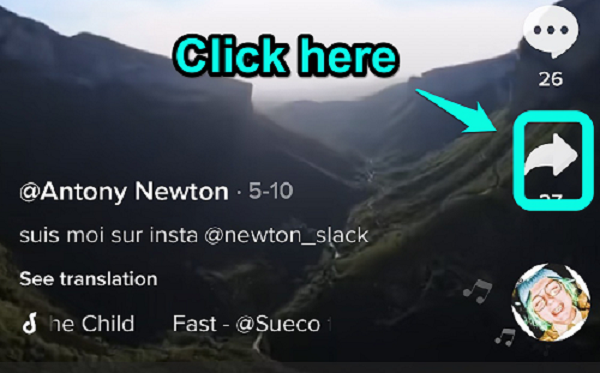
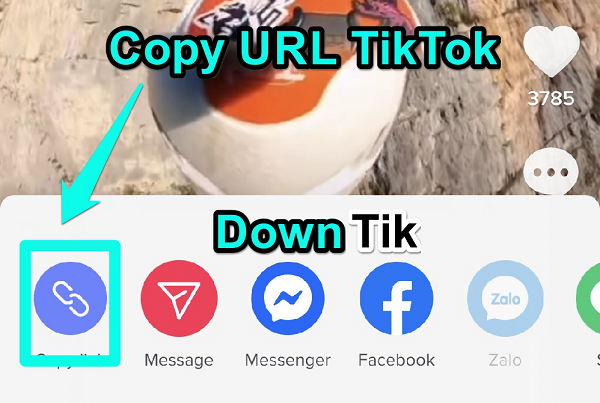
Open the video in the tiktok app and press the Share button, select copy link

2

Paste link into Downtik

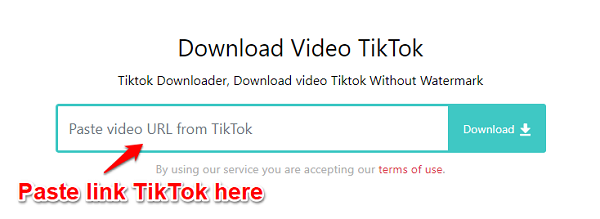
Open the website Downtik.IO, you will see the paste link box here at the top, click on it and use the key combination Ctrl + V or press the "Paste" box

3

Download

Press Download for Downtik to get the video, select quality if available, then press Download to save to your device

Why choose Downtik to download TikTok videos?

Download beautiful girls videos from Tiktok

Downtik downloads any public video on tiktok. Downtik satisfies people's need to download beautiful girls videos from Tiktok to watch. Women can also use this tool to save travel videos, cooking videos, makeup tutorials.

Download on iPhone, Samsung, Oppo phones

Users can open Downtik to download on all computer and phone devices. Downtik interface is friendly with all phone lines iPhone, Samsung, Oppo, Huawei, etc., fast download, no worry about quality reduction.

No app installation, extension, or apk download required

Just open Downtik.io using your browser, paste the link and download instantly. Saves phone memory and also avoids the risk of getting viruses from malicious apps and software.

Free and no annoying ads

You need to quickly download tiktok video for work but when you enter free downloader tools you have to watch a series of 30s ads. Very annoying. Downtik allows you to download as many videos as you want, completely free, and best of all no distracting ads that slow down user operations.

Download image slideshows, download video as ringtone

Downtik can download image slideshows as MP4 video with background music, or download each image separately. In addition, Downtik also supports downloading Tiktok videos as Mp3 to make ringtones. In the download options, click download MP3 to save only the audio file.

Full HD video quality, complete audio

Videos downloaded via Downtik retain the original HD or Full quality, without reduced sharpness, audio with the same quality as the original video.

Answering user questions

If it's a video created and posted by yourself, you can save the video directly to your device in the tiktok app without a logo. If you want to download another user's tiktok video without a logo, you need a third-party tool like Downtik, Snaptik, Ssstik. First:
• Open TikTok, find the video you want to download
• Press the Share button → Copy link
• Go to Downtik.IO, paste the link in the search box
• Press Download and select "No watermark"
• The video will be saved to the Download folder on your phone

Downtik always downloads videos in the best possible quality, like the original video uploaded to tiktok. If the original video on TikTok was compressed or had low quality, the downloaded video will also be like that. You can find and use an online video enhancement tool to fix it.

On the phone, the downloaded video will be in the download section (files), not in the photo library. You need to go to your phone's download folder to save it to the photo library.

No. The video is downloaded directly from the TikTok server to your device, so downloading videos on Downtik is completely anonymous and private.

No need! You only need the video link. This way, you don't need to log in or install the tiktok app and can still download and watch tiktok videos when friends send you the share link.

No. Downtik is completely free!

Downtik can only download public videos on TikTok. Private videos or regionally restricted videos cannot be downloaded. If the video displays "Content not available" or "API error", the video owner may have set privacy settings.

Using Safari on iOS 13 or higher:
• Copy TikTok video link
• Go to Downtik.IO using Safari
• Paste the link and press Download
• Press and hold the download button → Download link
• The video will be saved to the photo library or Files

No limit! You can download as much as you want.

Currently you need to download each video separately. You can try opening multiple browsers, multiple tabs, paste links to increase speed when you need to download multiple videos.

Yes! The downloaded video is a regular MP4 file, you can use any video editing app like CapCut, InShot, VN Video Editor to continue editing.

You can repost your own video on Facebook, Instagram. If you repost the video on Tiktok itself, views will be restricted due to duplication. If you repost someone else's video, you may be sued for copyright infringement.

After pasting the link, if the video has music, the "Download music" or "Download MP3" button will appear in the output options to download the MP3 file to your device.

Update history

February 5, 2026

User interface modification, making the tool friendlier to phone and computer screens, easier and faster downloading.

October 18, 2025

Continued server upgrade, can serve millions of visits and video downloads per day. Update Tiktok MP3 download feature, allowing downloading only audio from video, good audio quality for making ringtones.

March 3, 2025

Fixed API error issue when getting video from Tiktok.

November 2, 2024

Fixed error downloading individual images from Tiktok slideshow.

October 3, 2024

Server upgrade for more stable downloading. Improved recognition of 'vm.tiktok.com' video links.